For a little while now, my VM backups and my fileshare backups have been pushing to PBS without a single hiccup! The next thing I wanted to focus on was backing up the actual config of my Proxmox VE Host. Because after all, I am a novice and eventually I WILL do something that will mess up my proxmox install.
I found this post which was helpful to know what I should be considering backing up: How to Back Up and Restore Proxmox VE 9 Host Configuration (Step-by-Step Guide) | Saturn ME
I followed that article and was able to test out making a tar backup of my /etc/ and some other folders. /etc/pve is the main folder that has the proxmox specific configs. Further in the article there is a suggestion about using PBS to back up the tar files. The suggested command was pvesm upload (which is an argument of the proxmox storage manager command). pvesm allows you to interact with the logical volumes managed by proxmox (as opposed to just your mounted directories on the host itself).
I struggled with this for a bit because it seemed like the upload option of pvesm did not exist in the version I was using. I saw multiple references to it on some blogs and one random documentation site, but there is no mention of pvesm upload on the official proxmox documentation. I gave up on this, assuming it was removed at some point. The idea behind it at least was that I could upload/copy a file to a managed volume that was not mounted to the VE host.
proxmox-backup-client
Chatting with an LLM I learned that the proxmox-backup-client offers an excellent and native way to interact with PBS over command line, including the ability to make backups of things that aren’t VMs or containers in the proxmox UI. It enables you to “archive” basically anything and give it the metadata of any other backup being handled by PBS – which also lets you see and manage those backups in the PBS UI which is super handy.
I read some of the official proxmox-backup-client documentation here: Backup Client Usage — Proxmox Backup 4.1.2-1 documentation
Going down this path, I wrote a shell script that would execute proxmox-backup-client with the necessary parameters to backup my /etc/ folder to one of my PBS datastores. You can see from the docs that proxmox-backup-client utilizes some environment variables that you will need to set in a script. This was the resulting script:
set -eexport PBS_REPOSITORY="root@pam!pve-host-backup@hostname:store01"export PBS_PASSWORD_FILE="/root/.pbs-key"BACKUP_ID="pve-host-config"BACKUP_DATE=$(date +%Y-%m-%d)proxmox-backup-client backup \ etc.pxar:/etc \ root.pxar:/root \ --backup-id "$BACKUP_ID" \ --backup-type host \ --backup-time "$(date +%s)"``
This script backs up my /etc/ and /root/ directories. Here are some notes about the environment variables and their formatting:
PBS_REPOSITORY="root@pam!pve-host-backup@hostname:store01"
- root@pam represents the user and realm you are referencing in PBS
- !pve-host-backup represents the name of the API token being used to authenticate (more on the token below). If you use a token, you will put ![token name]
- @hostname is just the PBS host name or ip
- :store01 is the name of the datastore you want to back up to on the pbs server
PBS_PASSWORD_FILE="/root/.pbs-key"
This variable points to where you store the password or token for authentication. For API token, you will just paste the token value into a file and limit the privs on it with chmod 0600.
Create an API Token
If you want to go the API token route, you can make them in the PBS UI: Configuration -> Access Control -> API Token. Click add and you can name and expire your token as you wish. This name is what you will put in the environment variable defining the PBS connect string.
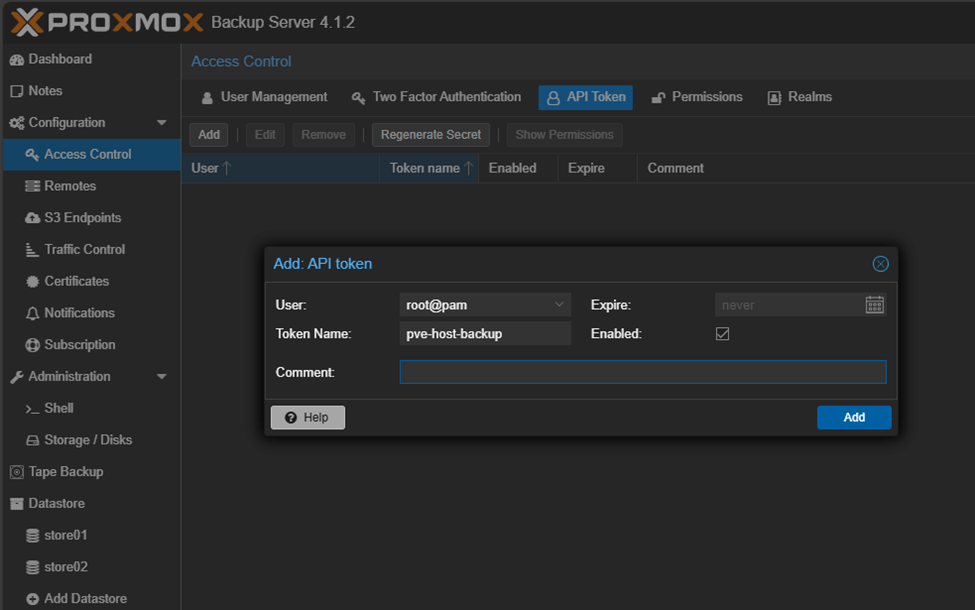
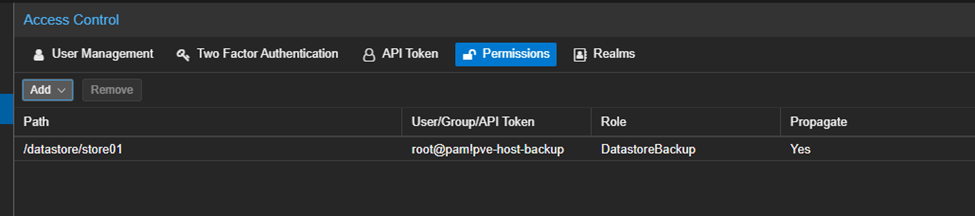
Then you need to grant that token access to whatever store you want it to be able to upload to:
Test and Run
Now with the variables filled out, and the API key stored in a file, I executed the shell script and it backed up the directories as expected.
I added this shell script to a cron job to run nightly.
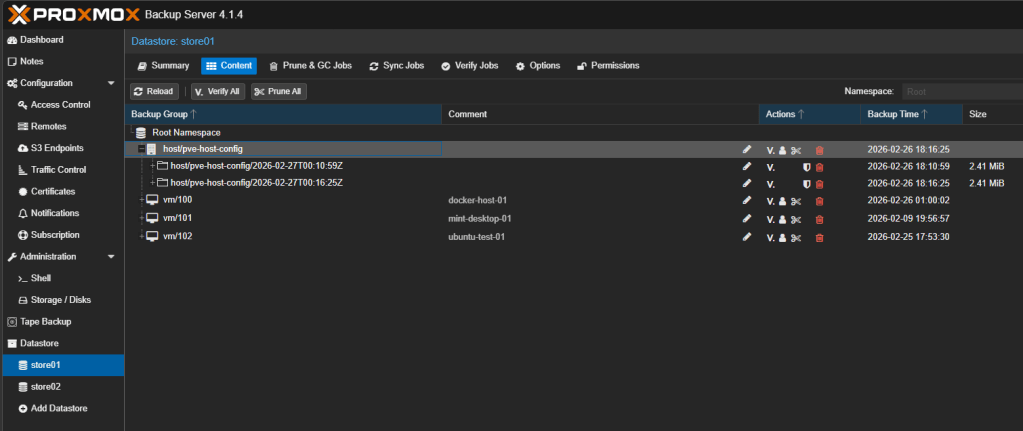
After completion the backup of the directories showed up right alongside the other VM backups on my PBS host:
After succeeding with proxmox-backup-client, it occurred to me that this could also be a potentially better avenue for backing up my fileshares as opposed to the samba-based approach I took previously. But for now, I will leave that alone.
 Dylan Projects