In enterprise use, of course, Dell intends for servers to be used with enterprise GPUs like the Nvidia Tesla line. There is a list of the officially supported GPUs from Dell.
But I don’t want to buy one of those, and I had an RTX 2060 Super laying around. I found other people successfully using these consumer-grade GPUs in their Dell servers so I went ahead with it.

Some helpful resources I used along the way:
AI Homelab Build – Dell PowerEdge R730, Nvidia GTX 3060, Proxmox – Step by Step – Part 1
How to install NVIDIA Tesla GPU in Dell PowerEdge R720/R730 Precision Rack 7910
The install itself was easy. I ran into two main struggles:
- Finding the right power cable
- Getting the server to stop running fans at 100% after installing the unsupported GPU.
Power Cable
One of the youtube videos mentioned they would put the part number of the cable down, but I could not find it. I found various discussion online about this being doable, but still could not find the exact cable or whether or not it was necessary to use something specific. Worse, I found several mentions of generic eBay cables that converted the riser connector to 6/8 pin PCIe power but they shorted the power to the chassis ground resulting in a hot cable and no success. Given this, and the fact that I did not really want to do a whole pinout with a volt meter, I kept looking for a specific part.
I can’t remember how exactly I found it unfortunately, but I found the dell part number:
0N08NH
This cable takes the poweredge pci riser power port (some weird 8 pin) and converts it to a standard PCIe 6 or 8 pin layout. I ordered one on eBay with the actual part number sticker on it, and this worked perfectly.
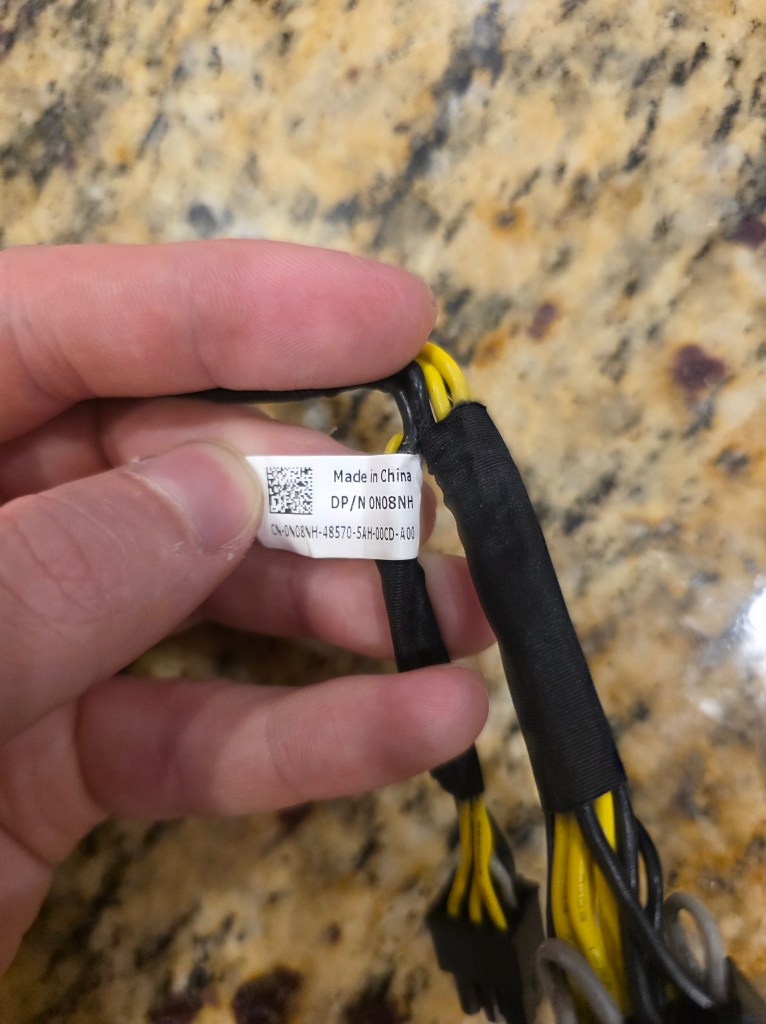
When you look at one of these you can see jumpers within each connector so there is definitely some atypical pinout to this riser. I’m sure many of you know better than I do what this connector is but I didn’t want to go down that rabbit hole so I bought the part.
Once you have the cable, the physical install is straight forward and the youtube links above cover that well.
Fan Speed Issue
Upon successful install, I found that the server was running its fans at 100% constantly. Apparently, this is a config response to installing an “unsupported” PCI device.
Mercifully, I found this post by seanthegeek and it solved the problem perfectly:
Note you will need to have iDRAC set up to manage this, so you will need to connect the iDRAC network card to your network and then configure the iDRAC settings in the Dell BIOS.
 Dylan Projects